Plan Your Week. Execute With Confidence.
A visual 7-day planning grid built alongside your time tracking, so you always know what to work on next.
No credit card required • 30-day free trial
Why Freelancers Love This
Built specifically to solve the headaches of running a freelance business.
7-Day Visual Grid
See your entire week at a glance with an intuitive Monday-to-Sunday layout. Drag tasks to reschedule instantly.
Recurring Task Support
Set up recurring tasks for routine work. Weekly calls, maintenance tasks, and regular client check-ins populate automatically.
Google Calendar Sync
Sync your planner with Google Calendar. See scheduled events and time blocks across both tools in real time.
Precision Engineered
For Growth
Every pixel is designed to help you save time and make more money.
Weekly Planning View
Layout your entire week in a clean grid format. Create tasks, estimate time needed, and assign them to clients.
Task Prioritization
Mark tasks as high, medium, or low priority. Focus on what matters most and maintain a realistic workload.
Calendar Integration
Connect with Google Calendar to see both your scheduled meetings and planned work blocks in one place.
In depth
Planning your week in TimerMVP: carry-forward, aging items, and the Friday review
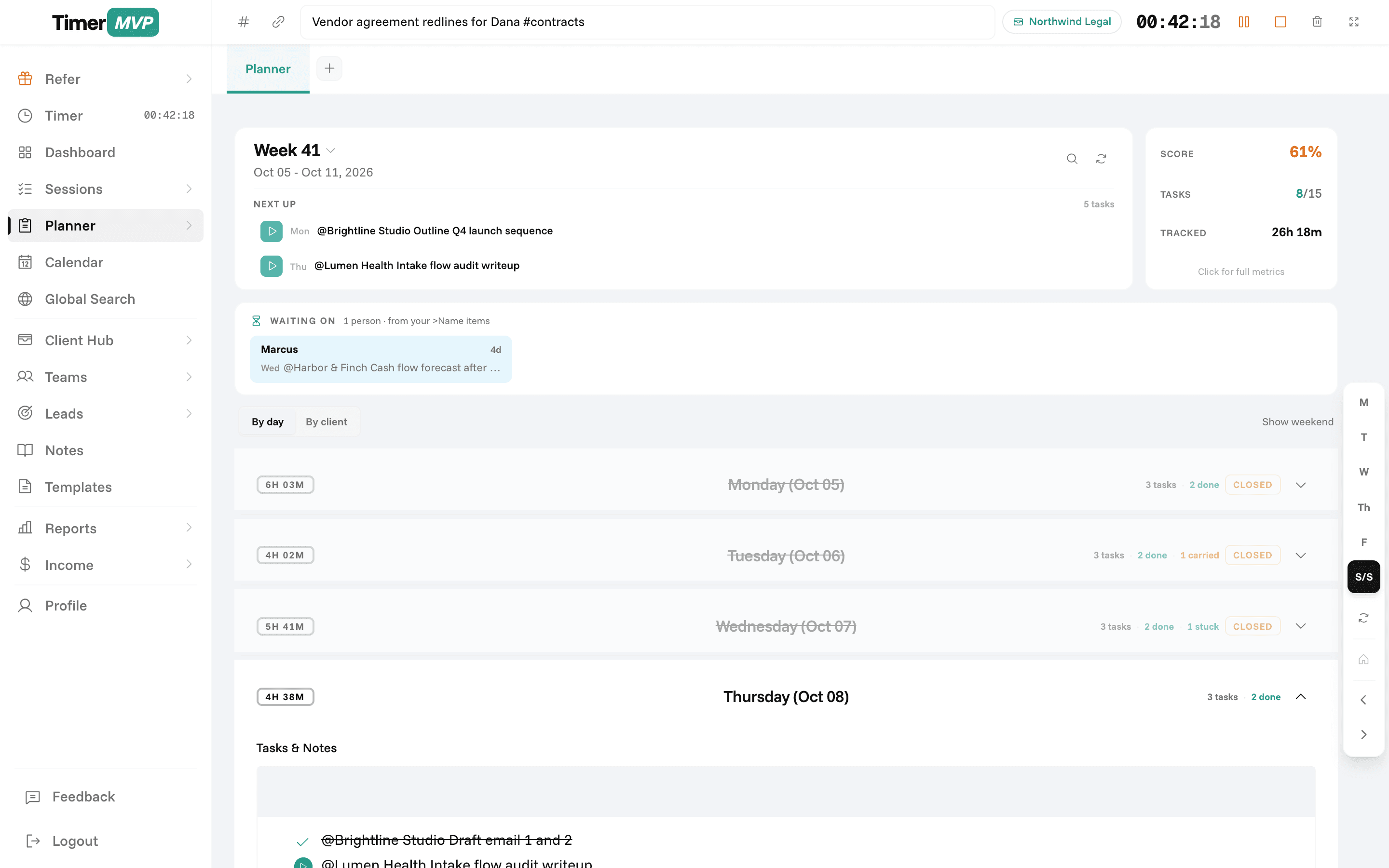
Most to-do lists fail the same way. Tasks pile up, nothing shows how long they have been sitting there, and Monday starts from scratch. The TimerMVP weekly planner is a Monday-to-Sunday grid that remembers. Unfinished items carry forward, old items get louder, and you can see who you are waiting on. It sits next to your timer, so the plan and the record share a home.
How do I plan a work week as a freelancer or consultant?
Plan on Sunday evening or Monday morning, and plan by day rather than as one long list. Put client deliverables on the day they need to happen, leave room for the calls already on your calendar, and keep admin to specific slots. A plan you can see across seven columns is much harder to overload than a list.
In TimerMVP, anything you do not finish carries forward to the next week, so nothing disappears just because the week ended. You start Monday with last week's leftovers already in place, and you decide what to keep, move, or drop.
How can I tell which tasks I keep putting off?
Every planner item shows an age pill. Once an item has been carried for 7 days, the pill turns amber. At 14 days it turns red. You do not have to remember that the proposal for a new client has been on your list for three weeks. The planner tells you.
Aging items usually mean one of three things. The task is unclear, it is blocked, or you are avoiding it. The color does not judge. It just makes the pattern visible so you can break the task down, ask for what you need, or admit it is not happening this month.
- Unfinished items carry forward automatically
- Amber age pill at 7 days, red at 14
- Type >Name to mark an item as waiting on someone
- Search across every past week
How do I track tasks that are waiting on a client or colleague?
Add a greater-than sign and a name to the item. Writing "Final logo files >Sarah" marks the item as waiting on Sarah. It shows in a different color, so you can tell at a glance what is in your hands and what is in someone else's.
Waiting items are not counted against you when the planner scores your week, because you cannot finish work you are blocked on. They do stay visible, which is the point. On Thursday you can scan the week, see three items waiting on the same client, and send one email that unblocks all of them.
What should a weekly review include?
A good weekly review is short. What got done, what did not, and why. TimerMVP prompts a week review on Friday that shows your completed items, what is carrying forward, and what is waiting on others. It takes a few minutes and gives you a cleaner start on Monday.
Pair it with your tracked hours. If the planner says you finished everything but your sessions show 14 hours on one client you planned 6 hours for, that is the real lesson of the week. The by-client view groups planner items by client, which makes these mismatches easy to spot.
Frequently Asked Questions
Plan Your Week Like a Pro
Turn chaos into clarity with a visual weekly planner that syncs with your time tracking.
No credit card required • Cancel anytime • 30-day free trial