TimerMVP vs Harvest
Harvest has been around since 2006. But freelancers in 2026 need more than timesheets and expense tracking.
Feature-by-Feature Comparison
See exactly how TimerMVP stacks up against Harvest.
| Feature | TimerMVP | Harvest |
|---|---|---|
| Time Tracking | ||
| Multi-timer (2 concurrent) | ||
| Break tracking | ||
| Pulse density heatmap | ||
| Session notes & hashtags | ||
| Client Management | ||
| Client profiles | ||
| Retainer tracking | ||
| Client requests / projects | ||
| Contracts & Reports | ||
| Contracts & e-signatures | ||
| Custom reports | ||
| PDF & CSV export | ||
| Expense tracking | ||
| Invoicing | ||
| Productivity | ||
| Weekly planner | ||
| Notes & journal | ||
| Google Calendar sync | ||
| Business Development | ||
| Lead pipeline / CRM | ||
| Conversion tracking | ||
| Team | ||
| Team tracking | ||
Why Freelancers Choose TimerMVP Over Harvest
Key advantages that make the difference for independent professionals.
More Features, Lower Price
Harvest charges $10.80/user/mo for time tracking and expenses. TimerMVP is $9.99/mo flat — with contracts, CRM, planning, and more included.
Lead Pipeline Built In
Track prospects from first contact to signed contract. Harvest has no CRM — you need a separate tool and another subscription.
Contracts & E-Signatures
Create, send, and get contracts signed without leaving TimerMVP. Harvest requires a third-party integration.
Pricing Comparison
Simple pricing vs. complicated tiers. See the difference.
TimerMVP Pro
- All features included
- Unlimited clients & sessions
- Contracts & e-signatures
- Lead pipeline CRM
- Team tracking
- 30-day free trial
- No credit card required
No credit card required
Harvest
- 1 seat, 2 projects
- Basic time tracking
- Basic invoicing
- Unlimited projects
- Invoicing & expenses
- Team management
In depth
Harvest vs TimerMVP: invoicing workflow or weekly clarity?
Harvest combines time tracking with invoicing and expenses, and it has been around since 2006. TimerMVP combines time tracking with planning, client economics, leads, and contracts, but it does not send invoices. That one difference decides a lot. This guide lays out what each tool is built to answer so you can pick the one that matches your week.
Is Harvest or TimerMVP better for freelance billing?
If billing means sending invoices from the same app where you track time, Harvest is built for that and TimerMVP is not. Harvest includes invoicing and expense tracking. TimerMVP does neither.
If billing means knowing exactly what you earned and being able to prove it, TimerMVP goes further. Each session saves the hourly rate at the time you logged it. Each client has its own billing increment. Custom reports filter by client and date range and export to PDF or CSV, so you can hand a client a clean record of the work behind an invoice you send from your accounting tool.
What does TimerMVP show you that Harvest does not?
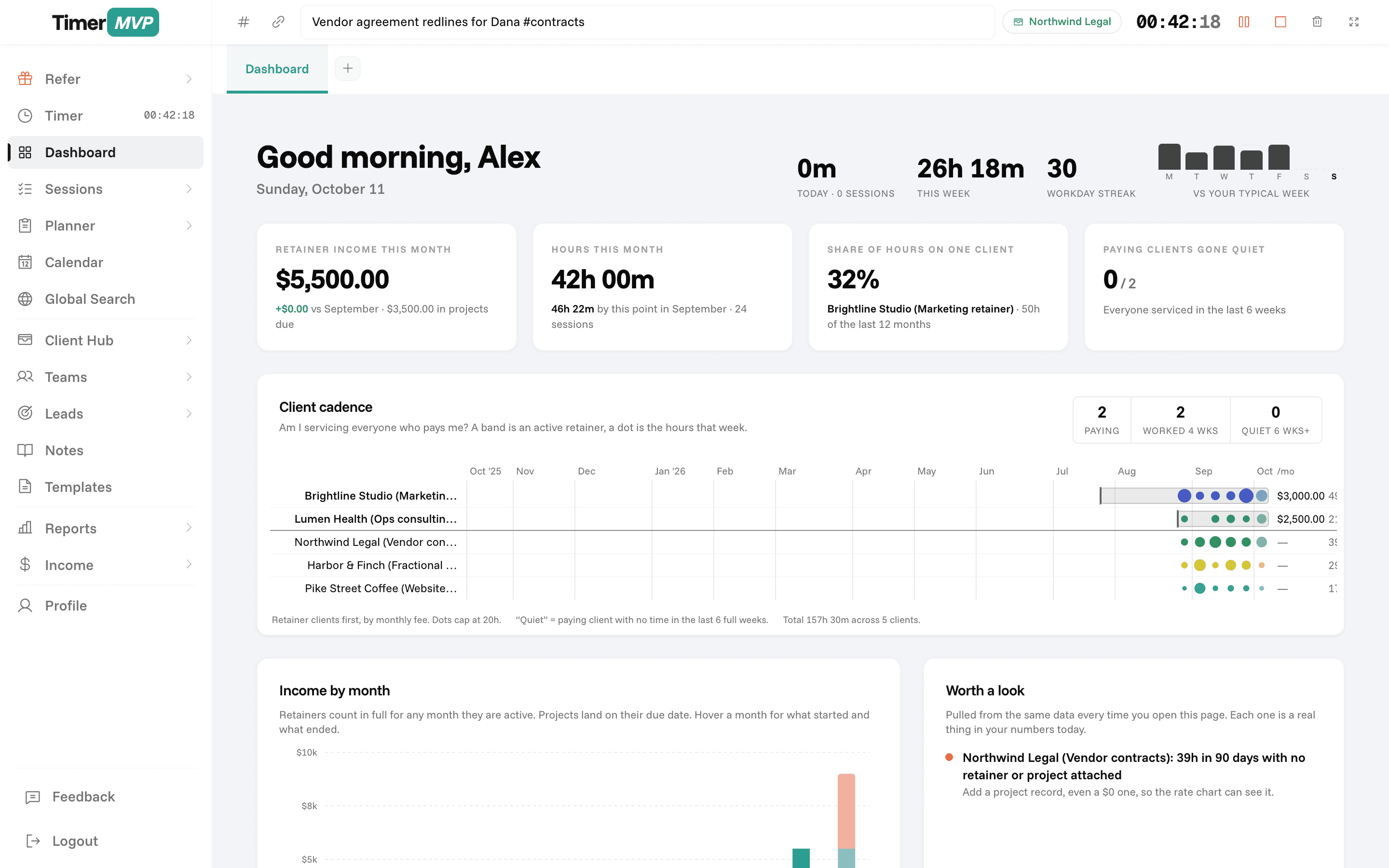
TimerMVP is built around a weekly scoreboard. The dashboard shows retainer income, how concentrated your revenue is in your top client, which clients have gone quiet, and your effective hourly rate per client. The income page compares actual earnings to projected earnings for the month.
It also covers the work before and around the hours. The planner lays out your week, carries unfinished items forward, and ends with a Friday review. The leads pipeline tracks prospects from first contact to won or lost. Contracts go out for e-signature from the same app.
How does each tool handle retainers and rate changes?
Retainers are where hours and income often drift apart. A client pays a fixed amount each month, and the hours behind it change. TimerMVP tracks retainers on the client record and shows the effective hourly rate you actually earned for that client. If a retainer has quietly turned into your lowest-paying work, you see it.
Rate changes are the other trap. When you raise your rate, older sessions in TimerMVP keep the rate they were logged at. Your history stays true, and your income reports do not rewrite last quarter at this quarter's prices.
When should you stick with Harvest?
Stick with Harvest if you want invoicing and expenses in the same place as your timesheets and do not want a separate accounting tool. That is a real convenience, and TimerMVP does not offer it.
Harvest is also the stronger choice for teams larger than a handful of people who need shared timesheets and approvals, and for anyone who relies on its integrations with other business software. TimerMVP has team tracking for small groups and a Google Calendar integration, but it is not trying to be an integration hub.
- You want to invoice straight from tracked time
- You track billable expenses alongside hours
- Your team is bigger than a few people
- Your process depends on connecting to other business apps
Frequently Asked Questions
More Than a Time Tracker.
Run your entire freelance business — from lead to signed contract — in one platform.
No credit card required • Cancel anytime • 30-day free trial