TimerMVP vs Toggl Track
Toggl is a great time tracker. But when you need contracts, a lead pipeline, retainer management, and a weekly planner — you need TimerMVP.
Feature-by-Feature Comparison
See exactly how TimerMVP stacks up against Toggl Track.
| Feature | TimerMVP | Toggl Track |
|---|---|---|
| Time Tracking | ||
| Multi-timer (2 concurrent) | ||
| Break tracking | ||
| Pulse density heatmap | ||
| Session notes & hashtags | ||
| Client Management | ||
| Client profiles | ||
| Retainer tracking | ||
| Client requests / projects | ||
| Contracts & Reports | ||
| Contracts & e-signatures | ||
| Custom reports | ||
| PDF & CSV export | ||
| Productivity | ||
| Weekly planner | ||
| Notes & journal | ||
| Google Calendar sync | ||
| Business Development | ||
| Lead pipeline / CRM | ||
| Conversion tracking | ||
| Team | ||
| Team tracking | ||
Why Freelancers Choose TimerMVP Over Toggl Track
Key advantages that make the difference for independent professionals.
All-in-One Platform
Stop juggling Toggl + Notion + HubSpot + HelloSign. TimerMVP gives you time tracking, contracts, CRM, and planning in a single app.
Save $540+ Per Year
Replace your entire freelance tool stack with one $9.99/mo subscription. No per-seat pricing, no feature gates.
Built for Freelancers
Toggl serves enterprise teams. TimerMVP is purpose-built for independent professionals who need to track time, manage clients, and grow.
Pricing Comparison
Simple pricing vs. complicated tiers. See the difference.
TimerMVP Pro
- All features included
- Unlimited clients & sessions
- Contracts & e-signatures
- Lead pipeline CRM
- Team tracking
- 30-day free trial
- No credit card required
No credit card required
Toggl Track
- Basic time tracking
- 5 users max
- Limited reports
- Billable rates
- Project estimates
- Time audits
- Fixed fee projects
- Scheduled reports
- Priority support
In depth
Toggl vs TimerMVP: which fits how you actually bill?
Toggl Track and TimerMVP both start from the same place: you click start, you do the work, you click stop. The difference is what happens after the timer stops. Toggl is a focused time tracker with a free tier. TimerMVP connects each session to a client, a rate, a planned week, and an income number. This guide walks through where each one fits.
Is Toggl good for freelancers who bill by the hour?
Yes, for the tracking part. Toggl Track is a well-known time tracker, and plenty of freelancers use it to log hours against projects and pull a report at the end of the month. If all you need is a clean list of hours, it does that job.
The question is what you do with those hours next. Most independent professionals bill several clients at different rates, some hourly and some on retainer. If your rates change, a report that multiplies total hours by today's rate gives you the wrong history. TimerMVP saves the hourly rate on each session when it is logged, so last spring's work stays priced at last spring's rate.
What does TimerMVP do that Toggl does not?
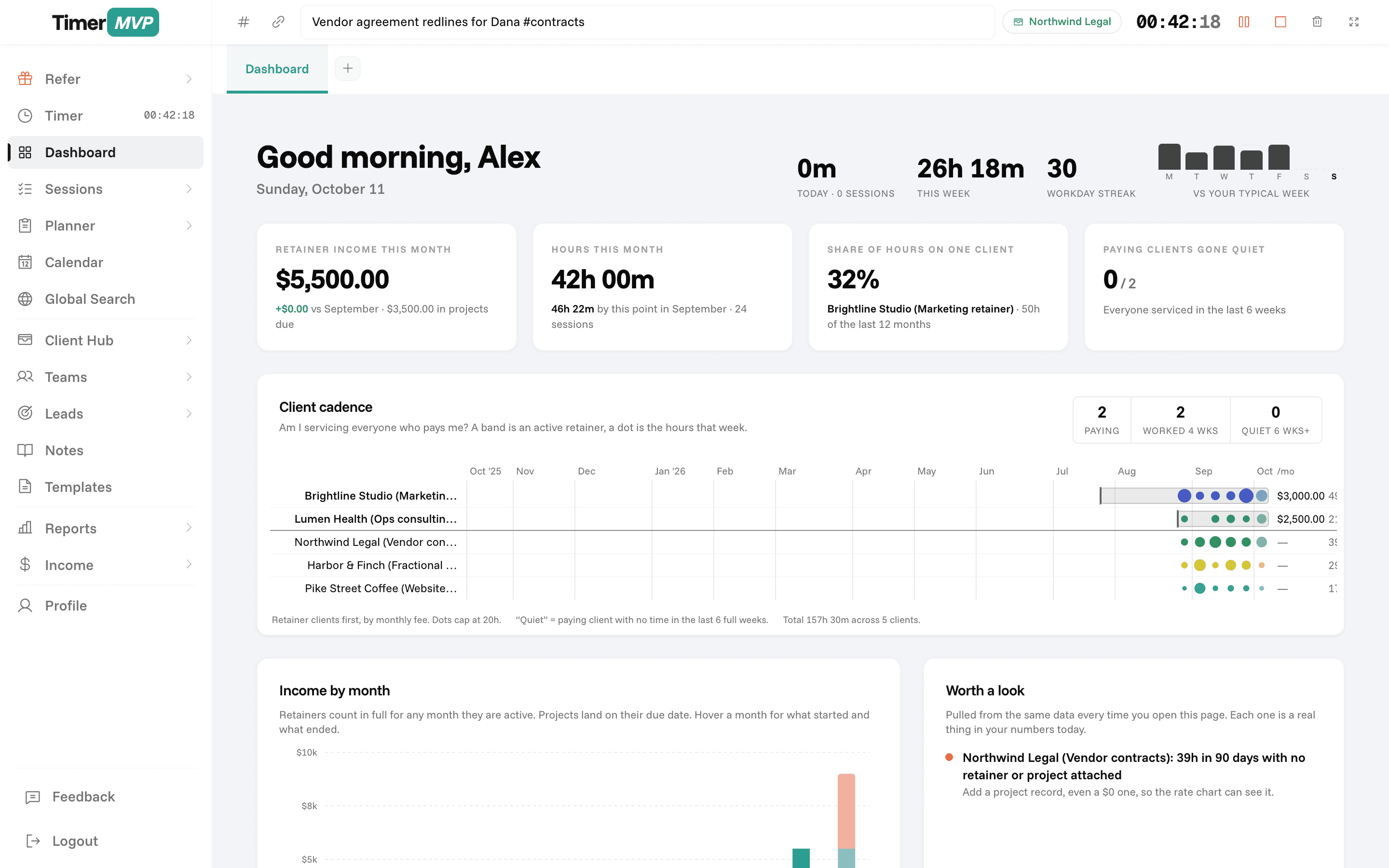
TimerMVP treats time as the input to a weekly scoreboard. Your dashboard shows retainer income, how much of your revenue sits with your top client, which clients have gone quiet, and your effective hourly rate per client. The income page puts actual earnings next to projected earnings for the month.
Around the timer, TimerMVP adds the planning and client work that usually lives in other apps. You plan the week in a Monday to Sunday grid, track leads through a pipeline, send contracts for e-signature, and keep notes and a journal tied to the same clients.
- Two timers at once, with pause, resume, and break tracking
- Per-session rate snapshots and per-client billing increments
- Retainers and ad-hoc projects on the same client record
- Weekly planner with carry-forward, item age, and a Friday week review
- Lead pipeline, contracts with e-signatures, and shareable notes
How do the weekly planning tools compare?
Toggl is built around recording time that already happened. TimerMVP adds the step before that: deciding what the week is for. The planner lets you lay out items by day, carry unfinished items forward, and see how long an item has been sitting with an age pill.
If you are waiting on someone, you type '>Name' in the item and it shows as stuck on that person instead of counting against you. On Friday, the week review shows what got done, what moved, and what is still waiting. A by-client view shows the same week grouped by who the work is for. Planning and tracking then sit side by side, so you can see whether your hours went where you meant them to.
When should you stay on Toggl?
Stay on Toggl if you are part of a larger team that already runs on it. Toggl is built to serve teams, and if your agency or employer tracks everyone there, moving yourself alone adds friction for little gain. TimerMVP includes team tracking, but it is designed around independent professionals and small groups, not large departments.
Toggl is also the better fit if you depend on a wide integrations ecosystem or a browser extension that starts timers inside other tools. TimerMVP is a web app with a Google Calendar integration and data export, not a hub of connectors. If you only want a free tracker and never look at rates or income, Toggl's free tier may be all you need.
Which one should you choose?
Choose Toggl if time tracking is the whole job and your team already lives there. Choose TimerMVP if you want to know, every week, what your hours earned, which clients carry your business, and whether your plan matched your actual week.
The simplest test is your Friday afternoon. If you can already answer what your effective rate was for each client this week, you may not need to change anything. If you cannot, try TimerMVP for 30 days with no card and run one real week through it.
Frequently Asked Questions
Ready to Replace Your Tool Stack?
Start your 30-day free trial and experience the all-in-one platform built for freelancers.
No credit card required • Cancel anytime • 30-day free trial