TimerMVP vs FreshBooks
FreshBooks is built around accounting. TimerMVP is built around your day — tracking time, managing clients, closing deals, and getting contracts signed.
Feature-by-Feature Comparison
See exactly how TimerMVP stacks up against FreshBooks.
| Feature | TimerMVP | FreshBooks |
|---|---|---|
| Time Tracking | ||
| Multi-timer (2 concurrent) | ||
| Break tracking | ||
| Pulse density heatmap | ||
| Session notes & hashtags | ||
| Client Management | ||
| Client profiles | ||
| Retainer tracking | ||
| Client requests / projects | Limited | |
| Contracts & Reports | ||
| Contracts & e-signatures | ||
| Custom reports | ||
| PDF & CSV export | ||
| Invoicing | ||
| Expense tracking | ||
| Double-entry accounting | ||
| Productivity | ||
| Weekly planner | ||
| Notes & journal | ||
| Google Calendar sync | ||
| Business Development | ||
| Lead pipeline / CRM | ||
| Conversion tracking | ||
| Team | ||
| Team tracking | ||
Why Freelancers Choose TimerMVP Over FreshBooks
Key advantages that make the difference for independent professionals.
Time Tracking That Actually Works
FreshBooks' time tracker is an afterthought. TimerMVP was built around it — multi-timer, breaks, activity density, and session notes come standard.
CRM & Lead Pipeline
Track leads from prospect to won/lost with conversion analytics. FreshBooks doesn't have any CRM or pipeline features.
70% Lower Cost
FreshBooks starts at $21/mo for the Plus plan. TimerMVP is $9.99/mo with no client limits — saving you over $130/year.
Pricing Comparison
Simple pricing vs. complicated tiers. See the difference.
TimerMVP Pro
- All features included
- Unlimited clients & sessions
- Contracts & e-signatures
- Lead pipeline CRM
- Team tracking
- 30-day free trial
- No credit card required
No credit card required
FreshBooks
- 5 billable clients
- Invoicing
- Expense tracking
- 50 billable clients
- Proposals
- Bank reconciliation
- Unlimited clients
- Auto expense tracking
- Priority support
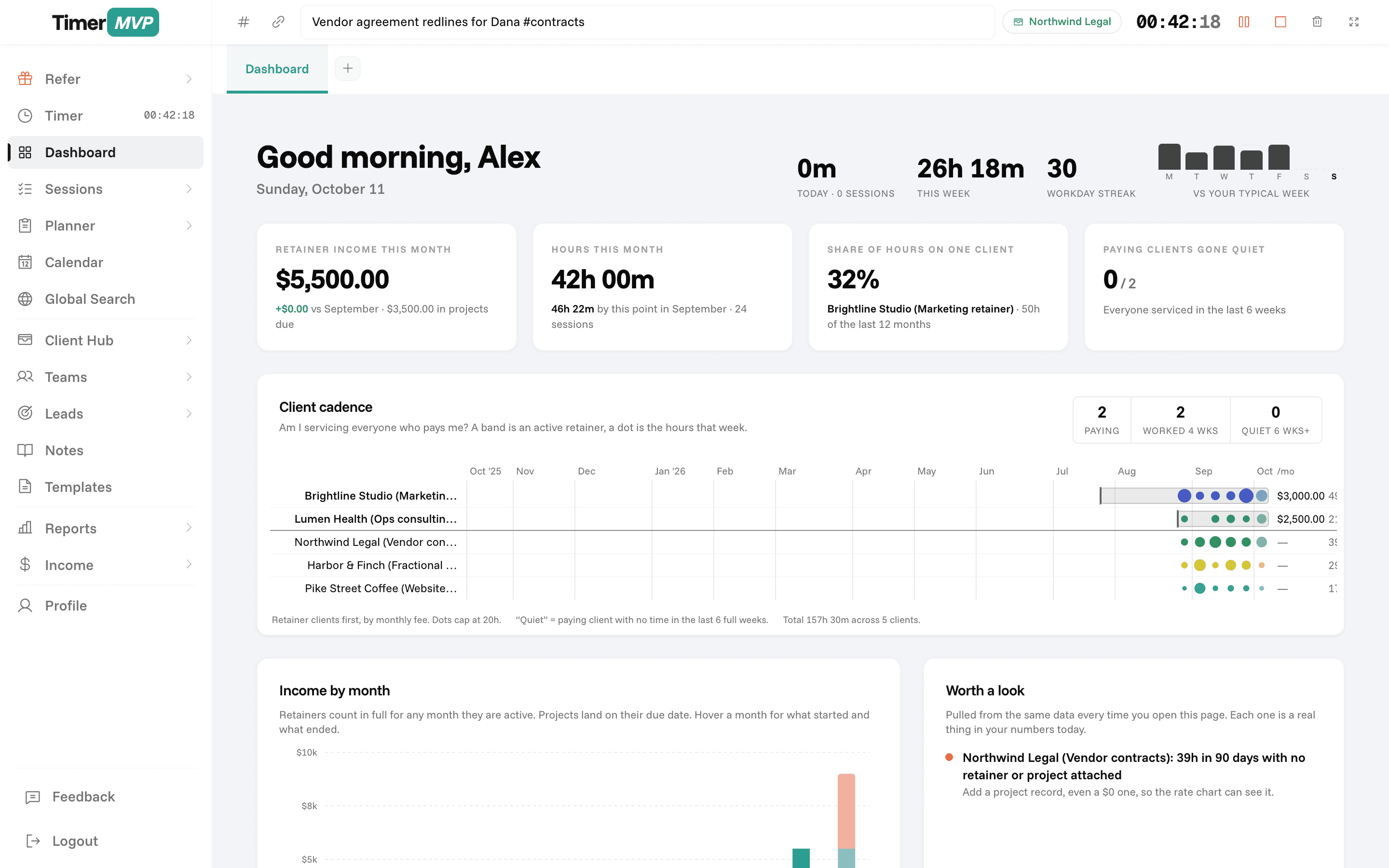
In depth
FreshBooks vs TimerMVP: your books or your week?
FreshBooks is accounting software that includes time tracking. TimerMVP is a time tracking and planning tool that includes client economics, leads, and contracts. They answer different questions. FreshBooks answers what you invoiced, spent, and owe. TimerMVP answers where your hours went and what each client is really worth per hour. Many people use both.
Do I need FreshBooks or a time tracker like TimerMVP?
Start with the question you most need answered. If it is about invoices, expenses, and getting your books ready for tax season, you need accounting software, and FreshBooks is built for that. TimerMVP does not do invoicing, expenses, or double-entry accounting.
If the question is how you spent your week, which clients take more time than they pay for, and whether you hit your plan, that is a time and planning problem. TimerMVP is built around it. The timer, the planner, and the dashboard are the center of the product, not an add-on to a ledger.
How does time tracking in TimerMVP compare to FreshBooks?
In TimerMVP, every session belongs to a client and saves the hourly rate at the moment you log it. You can run two timers at once, pause and resume, and track breaks. Sessions carry notes and hashtags, so you can see later what kind of work filled the time.
That detail feeds the numbers. The dashboard shows your effective hourly rate per client, retainer income, top-client concentration, and clients who have gone quiet. The income page compares actual to projected earnings. You get a weekly read on the business, built from time you tracked on purpose.
- Two concurrent timers with pause, resume, and break tracking
- Session notes and hashtags on every entry
- Per-session rate snapshots and per-client billing increments
- Custom reports with PDF and CSV export
When is FreshBooks the better choice?
FreshBooks is the better choice when you need accounting-grade invoicing, expense tracking, and bookkeeping in one place. If you want to send an invoice, record a payment, and categorize expenses without another tool, FreshBooks does that and TimerMVP does not.
It is also a better fit if your accountant works inside your accounting software, or if your work is mostly fixed-price and you rarely look at hours. In that case a full time and planning tool may add more than you need. TimerMVP does not connect directly to accounting software today, so plan on exporting reports rather than syncing.
Can you use FreshBooks and TimerMVP together?
Yes, and it is a common setup. TimerMVP runs the week: planning, tracking, client notes, leads, and contracts. FreshBooks handles invoices and the books. At the end of a billing period you run a TimerMVP report for each client and use it to build the invoice in FreshBooks.
The split keeps each tool doing what it is good at. Your accounting stays clean, and you still get a clear view of where your time goes and what it earns. If you only want one subscription, choose based on which question costs you more when you cannot answer it.
Frequently Asked Questions
Run Your Business, Not Your Books.
Time tracking, client management, contracts, and CRM — all for $9.99/mo.
No credit card required • Cancel anytime • 30-day free trial