The Best Toggl Alternative for Freelancers
Love time tracking? You'll love doing everything else in the same app — contracts, CRM, planning, journal, and more.
Why People Switch From Toggl
Common frustrations that drive freelancers to look for something better.
Still Juggling Multiple Apps
Toggl tracks time, but you still need separate tools for contracts, note-taking, and lead management. That adds up fast — in cost and complexity.
Per-Seat Pricing Adds Up
Toggl charges per user per month. If you work with subcontractors or a small team, the cost scales quickly — even for features you don't use.
No Business Operations Tools
Toggl is laser-focused on time tracking. There's no contracts, no CRM, no weekly planner, and no retainer management — things freelancers need every day.
Why TimerMVP Is the Better Choice
Here's what you get when you switch from Toggl to TimerMVP.
All-in-One Platform
Time tracking, contracts, CRM, journal, planner, and reports — one app, one login, one subscription.
Flat $9.99/mo Pricing
No per-seat fees, no feature gates. Every feature is included for every user at one simple price.
Purpose-Built for Freelancers
Every feature was designed for the way independent professionals actually work — not adapted from enterprise software.
Features That Set Us Apart
Everything you need to track time, manage clients, and grow your business.
Smarter Time Tracking
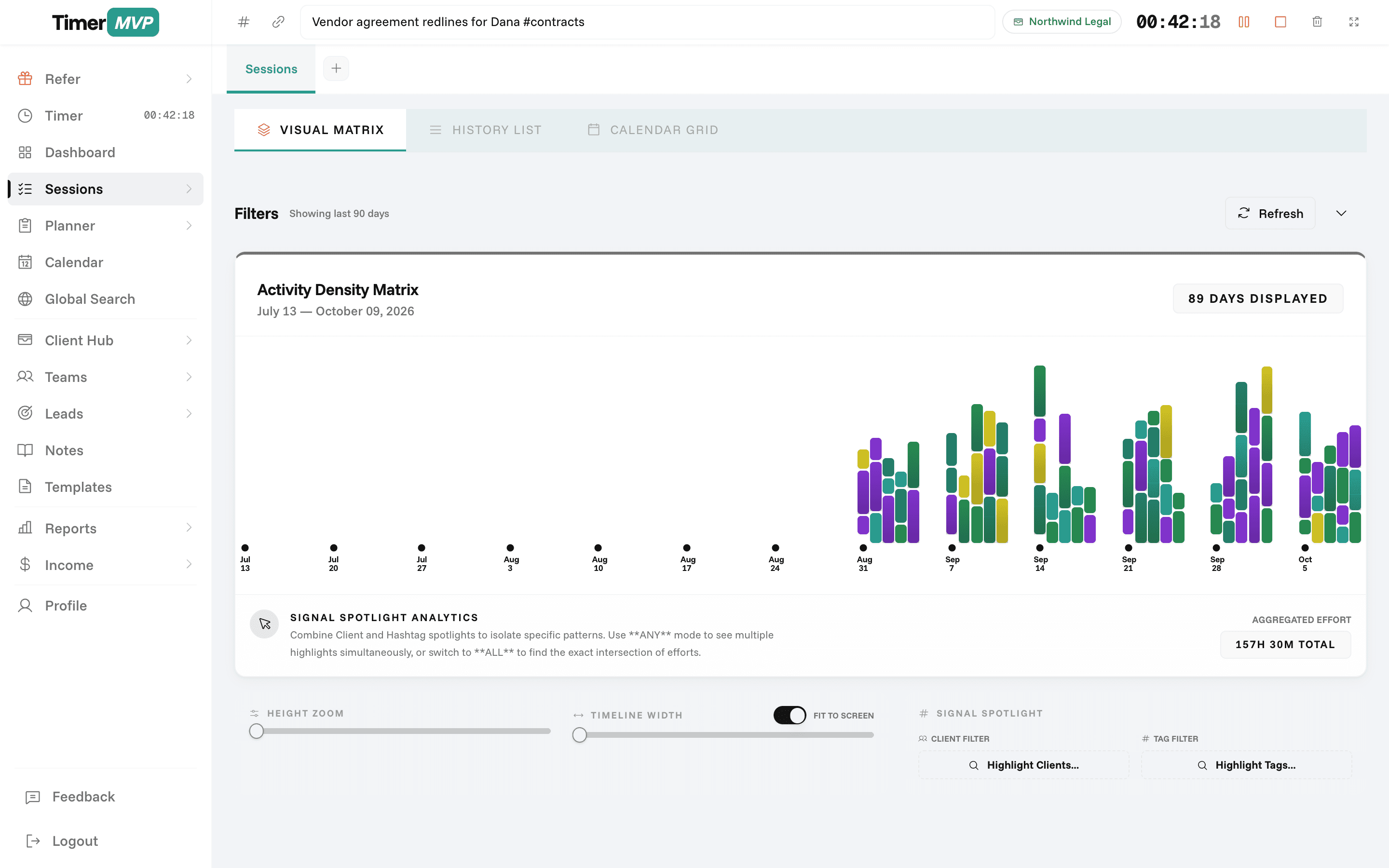
Run two timers simultaneously, track breaks, and visualize your work patterns with activity density heatmaps.
- Multi-timer with pause/resume
- Automatic break tracking
- Activity density visualization
- Session notes with hashtags
Contracts & E-Signatures
Build contracts from templates and collect digital e-signatures — no third-party tools needed.
- Contract builder with templates
- Custom terms & scope
- Digital e-signatures
- PDF export for records
Lead Pipeline & CRM
Track prospects from first contact to signed contract with built-in conversion analytics.
- Kanban-style pipeline view
- Prospect-to-client conversion
- Deal value tracking
- Activity timeline per lead
In depth
Switching from Toggl: what changes, and how to move in an afternoon
If you are reading this, Toggl probably still works fine as a timer. What you want is the next step: seeing what your hours earned, which clients carry the business, and whether your week went to plan. This page covers what changes when you move to TimerMVP, how to bring your clients and rates across, and what you give up.
How do I move my clients and rates from Toggl to TimerMVP?
Start with an export. Download your Toggl history as CSV and keep it as your archive. You do not need to bring every old entry across to get value on day one.
Then set up your active clients in TimerMVP. For each one, add the hourly rate, the billing increment you agreed on, and any retainer or ad-hoc project. This is the step that matters most, because every session you log from now on saves the rate at that moment. Most people finish this in under an hour, then start the first timer the same day.
If you used Toggl tags to mark types of work, carry the habit over as hashtags in your session notes. They give your reports the same context. Projects you are actively working on become client requests under the right client. Leave finished projects in the export. A smaller, current setup makes the first week of dashboard numbers easier to read.
- Export your Toggl history as CSV and keep it on file
- Add each active client with its hourly rate and billing increment
- Add retainers and ad-hoc projects to the right clients
- Connect Google Calendar if you schedule client work there
- Plan this week in the planner, then start your first timer
What will feel different after leaving Toggl?
Tracking itself will feel familiar: pick a client, start, stop. The difference is that each session now feeds a scoreboard. By the end of the first week, your dashboard shows your effective hourly rate per client, how much income comes from retainers, and how concentrated your revenue is in one client.
The week also gets a shape before it starts. You lay out items in the planner, carry unfinished work forward, and mark anything waiting on someone with '>Name' so it shows as stuck instead of late. On Friday, the week review shows what you finished and what slipped.
What do you give up when you switch from Toggl?
Be honest with yourself about this part. Toggl has a free tier and TimerMVP does not; after the 30-day trial it is $9.99 a month. Toggl is built to serve teams, so if your whole company tracks there, leaving alone may cause more trouble than it solves.
You also give up a browser extension and a broad set of integrations. TimerMVP is a web app you can pin to your taskbar or home screen, with a Google Calendar integration and CSV and PDF export. If your workflow depends on starting timers inside other apps, test that gap during the trial.
How long before TimerMVP is worth it?
Give it one full week. The value comes from seeing a complete Monday to Friday: planned against actual, hours against income, each client against the others. One day of data looks like a timesheet. A week starts to look like a business.
After two or three weeks, the quiet-clients list and the per-client rate become useful for decisions, such as which retainer to reprice or which lead to chase. If by then the numbers have not changed how you plan, Toggl may be the better fit for you, and your export is still there.
Frequently Asked Questions
Already have history in Toggl?
Export the detailed CSV and import it after you sign up. Every client and hour lands on your dashboard in about a minute.
Ready to Upgrade from Toggl?
Start free for 30 days. No credit card required. See why freelancers are making the switch.
No credit card required • Cancel anytime • 30-day free trial