Know Exactly What You're Earning. Down to the Penny.
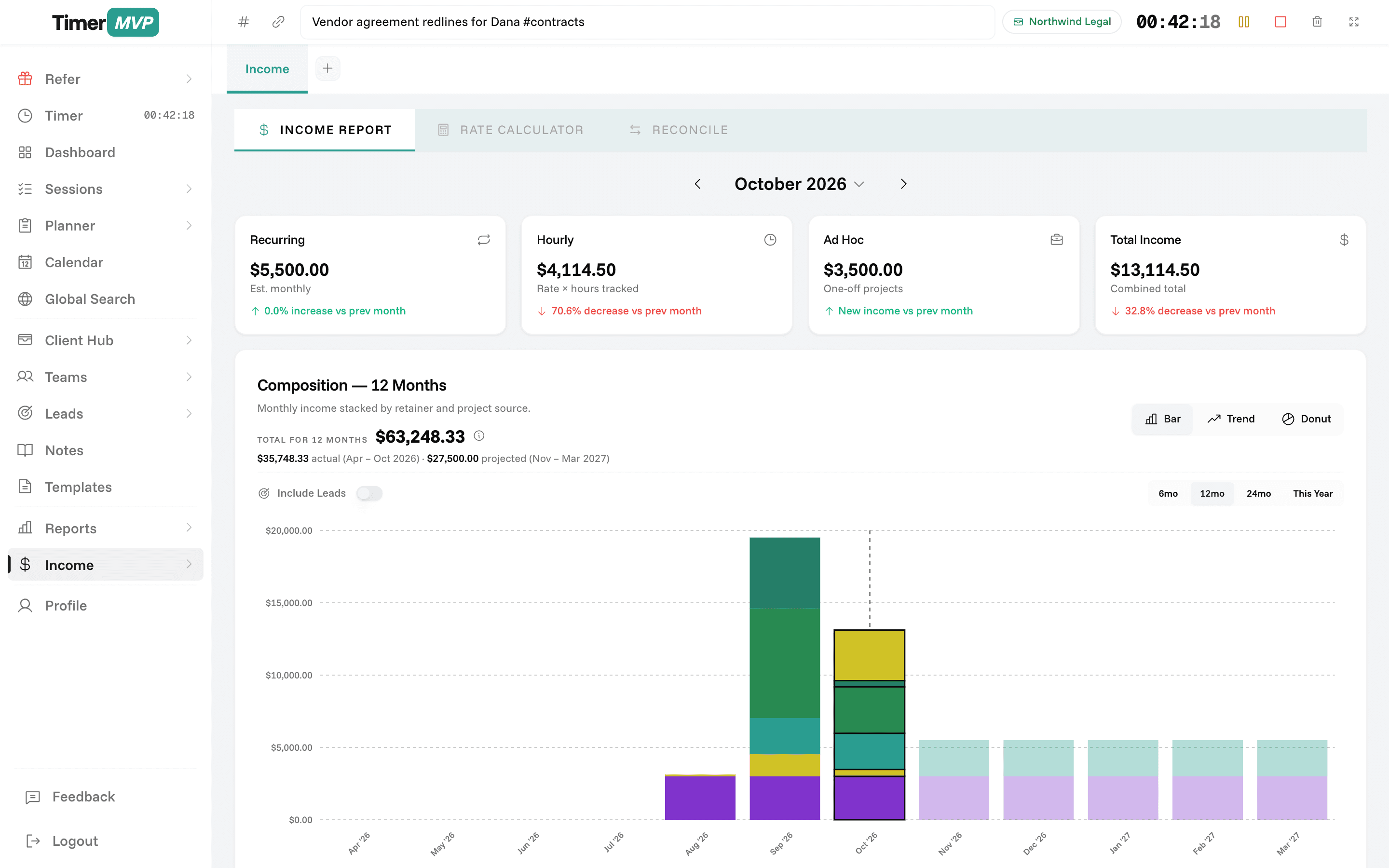
Monthly income comparison, real-time hourly rate calculations, and retainer tracking — powered by your actual time data.
No credit card required • 30-day free trial
Why Freelancers Love This
Built specifically to solve the headaches of running a freelance business.
Automatic Income Calculations
Income is calculated automatically from your tracked sessions. No manual invoice creation needed—just track time and get paid.
Monthly Comparison Charts
Compare earnings month-over-month. Spot trends, understand growth, and forecast future income with visual charts.
Retainer Balance Tracking
Monitor retainer usage in real time. Know exactly how much retainer balance remains and when it needs renewal.
Precision Engineered
For Growth
Every pixel is designed to help you save time and make more money.
Income Dashboard
View your earnings at a glance. Total income this month, this week, and today—all calculated from your tracked time.
Hourly Rate Calculations
See your effective hourly rate across all clients or per individual client. Understand your earning power.
Monthly Comparisons
Track how your earnings change month to month. Identify your best months and understand business patterns.
In depth
Income tracking for hourly, retainer, and project work
Before you send an invoice, you need to know the number is right. TimerMVP calculates income straight from your tracked sessions, retainers, and projects, so the figure you bill comes from the same record as the work. The income page then shows where that money came from, how it compares with what you projected, and how much each hour actually earned.
How do I calculate what to invoice a client each month?
For hourly clients, it is billable hours times the rate, rounded to that client's billing increment. For retainers, it is the agreed monthly amount. For projects, it is the fixed price when the work is delivered. The hard part is not the math. It is making sure every hour made it into the record.
Because TimerMVP stores each session with its own rate snapshot, your monthly total is the sum of the actual sessions, not current rates multiplied by grouped hours. If you raised a rate mid-month, the earlier sessions stay at the old rate. That is how the invoice should read, and it is how the number is calculated.
How can I see income from retainers, projects, and hourly work separately?
The income page splits your earnings into three lines: retainer, ad hoc projects, and hourly. A consultant might see that retainers cover the rent, hourly work is growing, and projects are lumpy. Each of those calls for a different decision about where to put your energy.
It also compares actual income against projected. Projected is what your retainers and scheduled work say you should earn this month. Actual is what has been logged so far. Watching the gap close during the month tells you early whether you are on track or need to fill a slow patch.
- Retainer, ad hoc, and hourly income shown separately
- Actual versus projected for the current month
- Per-client effective hourly rate
- Hours this month compared with last month
What is an effective hourly rate and how do I find mine?
Your effective hourly rate is total income divided by hours worked. It is the number that tells you what your time is really worth, especially on retainers and fixed-price projects. Say you quote a website at $6,000 and expect 40 hours. That is $150 an hour. If it takes 60 hours, you earned $100.
TimerMVP calculates effective rate per client on the dashboard. It is often the most surprising number in the app. The client you think of as your best may turn out to pay less per hour than one you barely notice, simply because their work keeps expanding.
Is TimerMVP an invoicing tool or an income tracker?
Think of it as the source of truth for what you are owed. TimerMVP tracks the time, applies the right rates, and gives you a clean monthly total and a detailed breakdown. The custom reports page exports that detail as a PDF or CSV that you can attach to an invoice or hand to your bookkeeper.
Many professionals already have an invoicing or accounting system they like. TimerMVP does not ask you to give that up. It makes sure the number you type into it is correct and that you can back it up with a session-by-session record if a client asks.
Frequently Asked Questions
Stop Guessing About Your Income
Get crystal-clear earnings tracking with automatic calculations from your actual time data.
No credit card required • Cancel anytime • 30-day free trial